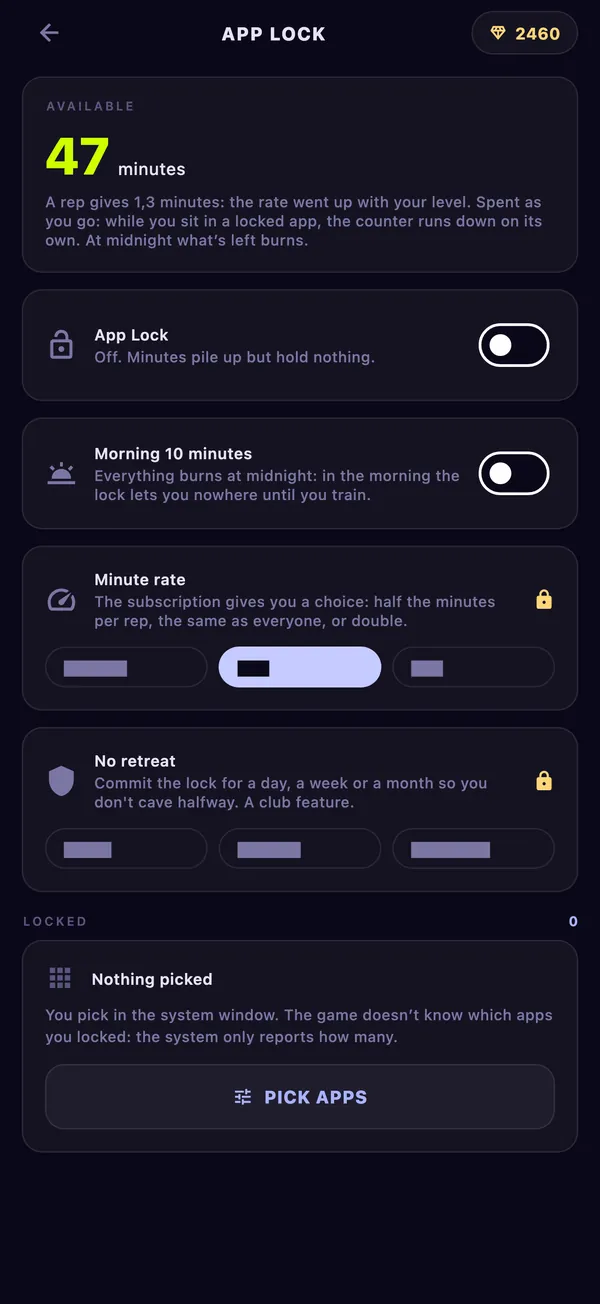

Setup takes a couple of minutes and you do it once. The steps differ by phone because iPhone and Android hand out this kind of access in different ways, so jump to yours.
Before you start
Find the App Lock card on the game’s home screen and tap it. If the card says “Off: minutes pile up but hold nothing”, that is normal: your reps already earn minutes, the lock just is not holding anything yet.
The lock holds once three things are done: it is switched on, the phone has given the game access to other apps, and at least one app is picked. Switch it on first, at the top of App Lock, because the access steps appear only after that. Until everything is in place, the status line says what is still missing.
Set it up on iPhone
On iPhone the lock runs on Screen Time, the same system Apple uses for its own limits.
- Open App Lock and turn the lock on.
- Tap Allow Screen Time. A system dialog asks for access. Confirm it.
- Tap Pick apps. A system window opens with apps, categories and websites. Tick what you want locked and close the window.
The game never sees what you picked. The system reports only how many items there are, so the card shows a number, not names or icons.
If you said no to the dialog, App Lock says the system denied Screen Time access, and the lock holds nothing until you allow it.
When you have minutes, the system lifts its shield from the picked apps and counts the time you spend in them. When the minutes run out, the shield comes back and tells you how to earn more.
Set it up on Android
Android needs two permissions, and both are switched on by hand in the phone settings. No regular prompt can grant them, so the game opens the right settings page for you.
- Open App Lock and turn the lock on.
- Grant usage access. This tells the lock which app is open right now; without it the lock cannot see that you opened a locked app. Tap the button in App Lock, find Pushgard in the list and turn it on.
- Grant display over other apps the same way. This lets the lock appear on top of a locked app.
- Pick apps from the game’s own list. Each app shows how long you spent in it this week, so the worst offenders are easy to spot. Use the search field if the list is long.
If the phone opens a general settings list instead of the Pushgard page, the game shows the name to look for.
A background guard then watches which app comes to the front. If it is locked and you have minutes, the guard spends them second by second while you stay. If you have none, a lock screen comes up with your minutes left, the reps still missing to your daily goal, and an Earn minutes button that takes you straight to a set. The guard keeps working after you close the game and after the phone restarts.
What to lock first
Lock one or two apps, the ones you open without deciding to. A feed or a short-video app is the usual pick. Lock everything at once and you will spend the first week fighting the lock instead of training.
Leave out anything you need to reach people or get to work: messages, maps, banking, your authenticator. The lock does not know which app is urgent, and it will not guess.
Start with the app you reach for first in the morning. If you can hold that one, add the next.
How reps turn into minutes
Every rep the camera counts adds minutes. At the start one push-up gives one minute. The rate grows by a tenth every five hero levels, up to two minutes per rep.
Other exercises go through a weight, so the same effort is worth about the same whatever you train:
| Exercise | One counted unit is worth |
|---|---|
| Push-ups | 1 push-up |
| Crunches | 0.6 of a push-up |
| Squats | 0.5 of a push-up |
| Plank | 0.15 of a push-up per second held |
So twenty squats give ten minutes at the starting rate, and a one-minute plank gives nine. The minutes land in the lock as soon as the set ends; you do not have to open App Lock or confirm anything. A rep the camera did not see gives nothing, which is why where you put the phone matters here too.
The clock runs only inside locked apps. Leave the feed and it stops. At midnight whatever is left burns, except ten morning minutes that carry over from the evening, so you can wake up and read something before your first set. Turn Morning 10 minutes off and the morning starts locked until you train. To see what a set costs you, work out a daily push-up target from your own max.
Make it stricter or softer
Two settings come with the Premium subscription. Minute rate gives half the minutes per rep for a stricter lock, the standard rate, or double for a softer one. The rate never changes how the camera counts.
No retreat commits the lock for a day, a week or a month. Until the period ends, the game will not let you turn the lock off, remove apps, bring back the morning minutes or raise the rate. Making it stricter is still allowed. Before you confirm, the game warns that the only way out is deleting it from the phone.
Everything else on this page works without a subscription. The app blocker page has the rules in one place, and the push-up counter explains the counting behind every minute.