Block YouTube until you do push-ups

Pick YouTube in the Pushgard app lock and it opens only for minutes you earn with reps, one per push-up at the start. The lock covers the whole app, Shorts and long videos alike, and the clock runs only while YouTube is on screen. On iPhone add youtube.com too.

Read
1 min
Published

YouTube is the hardest app to lock because it is both a feed and a tool. You may need a tutorial for work and lose an hour to Shorts in the same evening.

On iPhone

From App Lock, open Pick apps and tick YouTube.

Add youtube.com under websites as well, or a link in a search result opens the same videos in Safari.

On Android

With usage access and the overlay permission granted, YouTube shows up in the game’s list with your time in it this week.

The lock on Android covers installed apps only. YouTube in a browser stays open. If that is how you watch, pick the browser too.

Shorts cannot be locked on their own

The lock works on whole apps, so there is no switch for Shorts only. What works in practice is to let the minutes carry the difference: a ten-minute tutorial costs ten push-ups at the starting rate, and an hour of Shorts costs sixty. Long videos you need stay cheap, the endless ones stop being free.

If YouTube is part of your job, leave it out at first and lock a feed you only scroll. You can add it later.

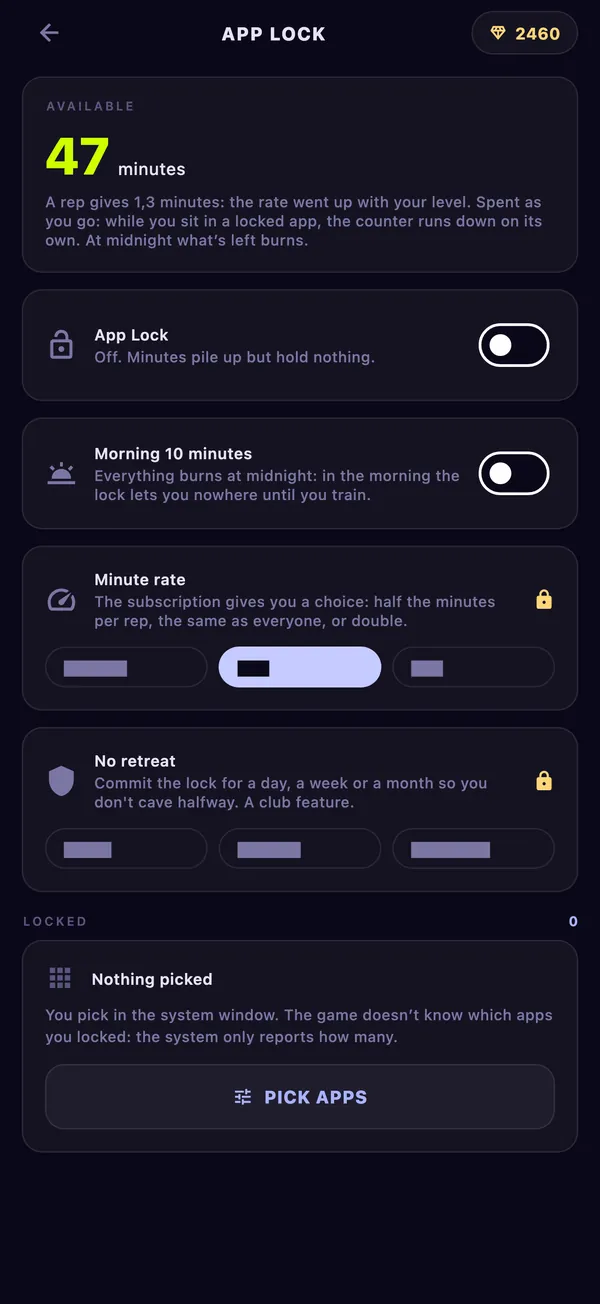
Pushgard app lock screen with locked apps and earned minutes
In the app

Earn your apps with reps

Pick the apps that eat your evening. They stay locked until you earn minutes with push-ups, squats, crunches or plank.

App blocker that makes you exercise

Questions

Still wondering

Short answers to what people ask next.

Can I block YouTube Shorts and keep the rest of YouTube?

Not with the Pushgard lock: it covers the whole app. The minutes make long viewing expensive instead.

Does YouTube in the background use my minutes?

The clock runs while a locked app is open in front of you. When you leave it, the clock stops.

All questions

Free on iPhone and Android

The first slime is waiting

Lean the phone against a wall and do one set. That’s all the gear you need.